
Ultimate PC Buyer’s Guide
Buying a PC shouldn’t feel like gambling. This guide breaks down what actually matters for gaming, streaming, Warzone/Valorant performance, editing, and workstation workloads — so you buy the right build the first time.
1) Start With One Question: What Are You Using the PC For?
The fastest way to waste money is buying parts without a goal. Start here, then build around the workload.
- Competitive Gaming: high FPS, low latency, consistent frame pacing (Valorant, Warzone).
- AAA Gaming: visuals + smooth performance at 1440p/4K.
- Gaming + Streaming: extra CPU headroom + stability for long sessions.
- Creator / Workstation: editing, 3D, CAD, AI workloads, multitasking.
Start a free build consultation →
2) CPU: The Brain of Your PC
CPU choice affects frame pacing, multitasking, and streaming smoothness — but “more cores” isn’t automatically better.
3) GPU: Where Performance Shows (and Where Most Budgets Should Go)
For gaming, the GPU is usually the #1 performance driver — especially at 1440p and 4K.
- 1080p: best value, very high FPS for esports.
- 1440p: the modern sweet spot (sharp visuals + high refresh).
- 4K: demands a stronger GPU; prioritize VRAM and upscaling support.
4) RAM: Don’t Quietly Bottleneck Yourself
RAM is the “invisible limiter.” If you multitask, stream, or run newer titles, 32GB is the sweet spot.
- Minimum for gaming: 16GB
- Recommended: 32GB
- Creator / power user: 64GB+
5) Storage: Speed & Layout Matter
A modern NVMe SSD makes everything feel fast: boot, loads, editing cache, file transfers. A two-drive setup is really only ideal if extra space is needed.
- Drive 1 (NVMe): OS + main apps/games
- Drive 2 (SSD/HDD): extra games + storage + archives
6) Cooling & Airflow: Performance You Already Paid For
Hot PCs throttle. Good airflow keeps performance consistent, improves stability, and often reduces noise.
- Quality CPU cooling (air or AIO liquid)
- Proper case airflow + fan layout
- Clean cable routing (helps airflow more than people think)
7) Power Supply: Don’t Gamble With Your Entire System
A quality PSU protects components and keeps systems stable under load — especially with modern GPUs.
- Choose reputable brands + proper wattage headroom
- Prefer 80+ Gold (or better) for efficiency and reliability
- Plan for future GPU upgrades (power requirements go up fast)
Recommended Builds (Real Systems You Can Buy Now)
These are proven build tiers that cover the most common buyer needs — budget 1440p, entry streaming, and high-end FPS.
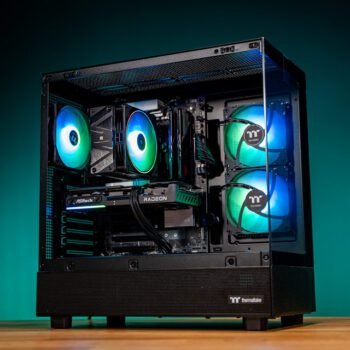
Challenger
Budget 1440pStrong 1440p performance without overspending — the “smart buy” tier.
- Ideal for 1440p high settings
- Great value per dollar
- Easy upgrade path
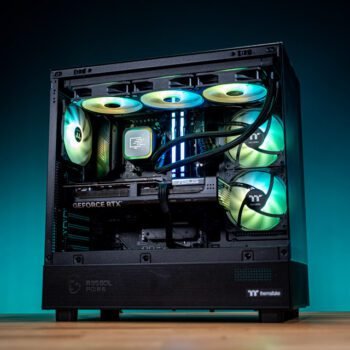
That’s so 70s
Gaming + StreamingBalanced for high-refresh gaming and streaming — the best all-around “do it all” pick.
- Excellent for 1440p gaming
- Streaming-ready performance
- Great for competitive titles
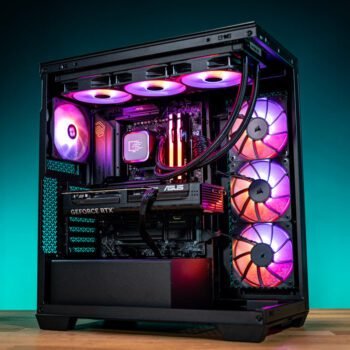
AMDominance
High-End FPSBuilt for competitive high-refresh 1440p and serious performance headroom.
- High FPS focus + smooth frame pacing
- Strong upgrade headroom
- Premium performance tier
Want something tailored? Create a Custom Build →
Best PC for Warzone & Valorant
For Warzone and Valorant, the goal is high FPS, low input latency, and consistent frame pacing. The best “sweet spot” option is:
That’s so 70s
Warzone + ValorantBuilt for 1440p gaming with competitive performance headroom — a perfect fit if you want one PC that can handle esports + modern AAA titles.
- Great for high refresh 1440p gameplay
- Streaming-ready for creator workflows
- Balanced “do-it-all” build tier
The Most Common PC Buying Mistakes
- Overspending on CPU but underpowering the GPU
- Cheap power supplies that cause instability
- Not planning storage (NVMe vs bulk storage)
- Poor airflow cases that throttle performance
- Buying hype instead of matching your games/apps
Upgrade Smarter: Trade-In + Financing
If you’re upgrading from an older PC, trade-in value can reduce the jump. If you want to keep cash flexible, financing options are available.
View Trade-In →
View Financing →
Want the “right build” without the guesswork?
Tell us your games/apps, monitor resolution, and budget — we’ll match you to the best build tier (or spec a custom build).
PC Buyer FAQ
What’s the best PC for Warzone and Valorant?
For Warzone and Valorant, you want strong 1440p performance, high FPS, and consistent frame pacing. The That’s so 70s build is designed around that sweet spot.
Should I buy ready-to-ship or go custom?
If you want it fast, go Ready-to-Ship. If you want a build tuned to your exact games/apps, aesthetics, and budget, go Custom.
Do you offer financing or trade-ins?
Yep — see Financing and the Trade-In Program.
I’m not sure what to buy — what’s the fastest way to get a recommendation?
Use the Free Build Consultation. Share your games/apps, monitor resolution, and budget — we’ll match you to the right tier.
More Ways to Build With StinceBuilt
- PC Configurators — choose a platform and customize your build.
- Ready-to-Ship Systems — fully built, tested, and ready now.
- Custom Build Request — we spec it for your exact needs.
- Financing Options — upgrade with monthly payments.
- Trade-In Program — apply trade value toward your upgrade.